Dragify · The AI platform developed by Cloudilic
AI agents that understand, decide and act.
Dragify is the AI platform developed by Cloudilic. Describe a process in chat and Dragify turns it into a visual workflow of AI agents, knowledge and system actions that your team can review, edit and run — with human approval where required.
Visit dragify.ai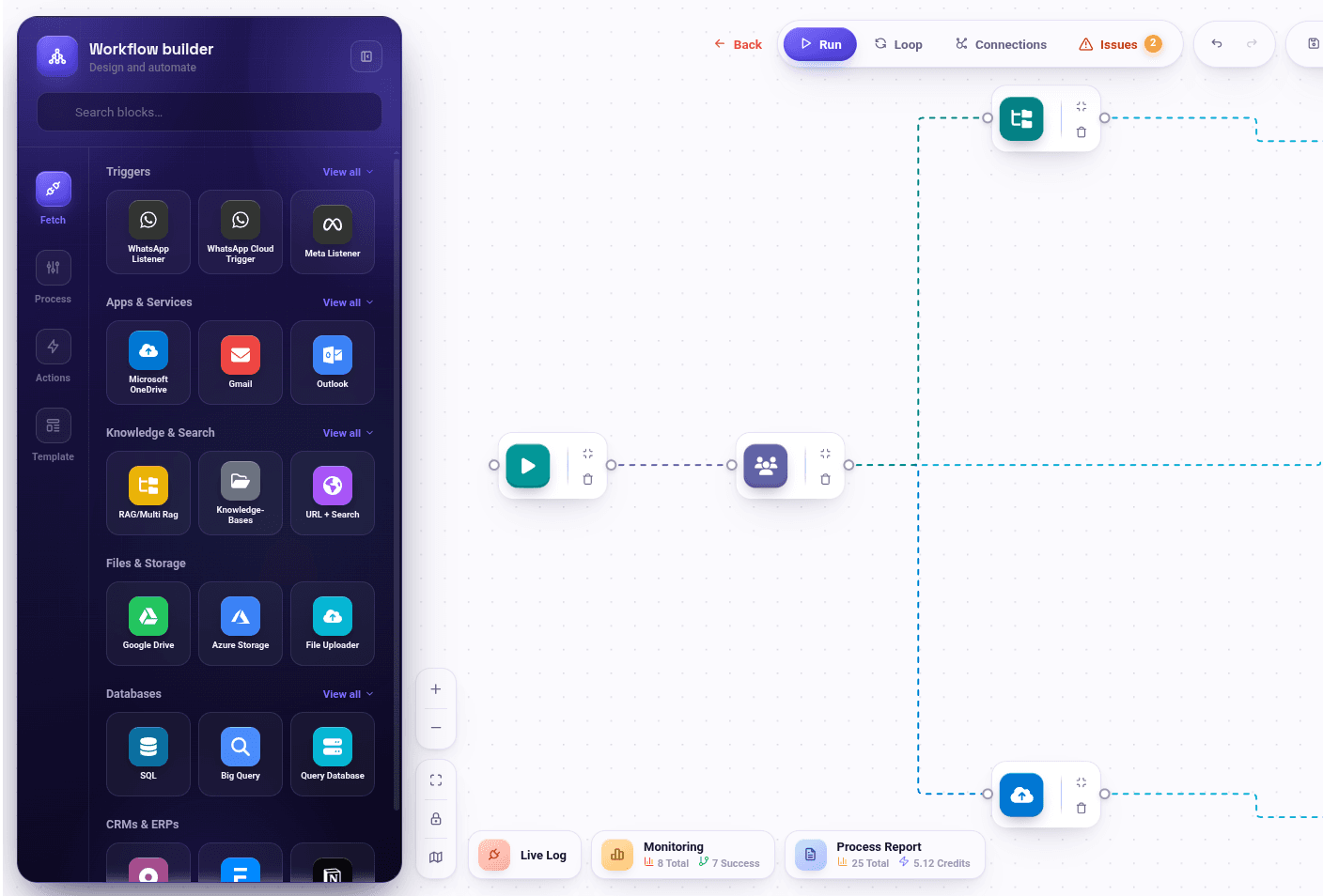
- Chat-to-Workflow
- Visualized Workflow
- Operational AI agents
- Human approval
- Enterprise integrations
Core capabilities
Describe it in chat. See it as a workflow. Run it with people in control.
Chat-to-Workflow and Visualized Workflow sit at the heart of Dragify: the quickest way to turn how your team explains a process into automation everyone can see, check and trust.
“When an invoice arrives by email, extract the totals, check them against the purchase order and ask finance to approve anything over 50,000.”
- 1Invoice email arrivesTrigger
- 2Read the invoiceAI
- 3Match it to the purchase orderAI
- 4Finance approves anything over 50,000Approval
- 5Update the ERPAction
Chat-to-Workflow
Describe the process in plain language. Dragify drafts the workflow, with its triggers, AI steps, knowledge and actions, as a preview you confirm, edit or discard before anything is applied.
- Choose the project and workflow category
- Describe the automation in chat
- Review the generated workflow preview
- Confirm, edit or cancel before it is applied
Visualized Workflow
Every automation lives on a visual canvas as connected blocks: triggers, AI agents, knowledge, approvals and system actions. Teams see exactly what will run, change it block by block and follow each run as it happens.
- Drag-and-drop workflow canvas
- Loops, variables and routing
- Human approval steps inside the flow
- Live log and run monitoring
How Dragify agents work
Fetch. Understand. Decide. Act. With people in control.
These are the capabilities an agent brings to a process — not a fixed order. Where a workflow needs authorization, the approval gate sits before the action it protects.
Fetch · 1 / 5
Bring the right information together.
Bring together relevant information from connected documents, applications and data sources.
- Knowledge folders and files
- Multi-source retrieval
- Connected enterprise systems
Capabilities
Everything an operational AI agent needs.
From the knowledge an agent draws on to the systems it acts in and the controls that keep it governed.
- 01
AI agents and workflows
Build agents that participate in the process, from understanding information to taking the next operational step.
- Visual AI workflow builder
- Multi-step agents
- Automated actions
- Human-in-the-loop approval
- 02
Governance
Keep enterprise automation governed, with defined access and a traceable record of activity.
- Role-based permissions
- Auditability
- Traceability
- 03
Enterprise knowledge
Give agents access to the business knowledge relevant to their work.
- RAG
- Governed retrieval
- Knowledge folders and files
- Multi-source retrieval
- 04
Documents
Turn complex documents into information your agents and teams can work with.
- OCR
- Arabic and English document understanding
- Large-document processing
- Extraction
- 05
Operational automation
Connect analysis with action across document-heavy and operational workflows.
- RFP analysis
- Compliance matrices
- Reports
- Approval workflows
- AI-assisted decision processes
AI interfaces
Bring AI assistance to the interfaces used by customers and teams.
- Chat agents
- Voice agents
- External and customer-facing interfaces
Dashboards
Turn operational information into dashboards that help teams understand and manage their work.
- Operational dashboards
- Dashboard Builder
- Text-to-Dashboard
Enterprise connections
Connect agents with the enterprise systems and data sources your organization already uses.
- Microsoft Teams
- SharePoint
- OneDrive
- SAP
- APIs
- Databases
- Internal applications
Deployment
Deploy in an environment that fits your organization’s needs.
- Cloud
- Private cloud
- VPC
- On-premise
Available connections and deployment options depend on your edition and environment; we confirm the connection scope with you during the demo.
Capability spotlight
Describe what you need to see. Work with the dashboard.
Dashboard Builder and Text-to-Dashboard turn operational information into views teams can use to understand and manage their work — starting from a plain-language description.
“Show open approval requests by department and what is waiting longest.”
Dragify at work
Four ways to see Dragify in practice.
Pick a scenario, then step through it.
A dedicated AI agent for each investment profile manager.
Agents retrieve relevant portfolio and investment information, analyze documents and data, prepare summaries and reports, and surface issues — while the manager stays in control.
Where teams use Dragify
Automation across the business.
Operations management
Task routing, data syncing and real-time alerts.
Customer support
Ticket sorting, auto-responses and always-on availability.
Financial operations
Invoice processing, expense management and financial reporting.
Sales automation
Follow-ups, lead nurturing and scheduling.
HR operations
Request handling, schedule management and admin automation.
Marketing automation
Campaigns, content and engagement workflows.
- AI Agent StudioBuild agents that work across your processes.
- RAG / Multi-RAG StudioRetrieval-augmented generation over your knowledge bases.
- OCR SuiteRead scanned and complex documents.
- Integration ManagerConnect external services, APIs and data sources.
- Workflow BuilderDesign automated sequences visually, with loops and variables.
- Triggers & listenersStart workflows from webhooks, email, messaging and file events.
Qatar Securities Company · powered by Dragify
Built for real enterprise environments.
Dragify underpins Cloudilic’s paid enterprise implementation at Qatar Securities Company, supporting governed AI agents and automation within a regulated financial-services environment.
- Enterprise adoptionA paid implementation at Qatar Securities.
- Governed deploymentDragify in a regulated financial-services environment.
- Operational AIAgents supporting investment professionals within real workflows.
Move from AI conversations to AI-powered operations.
Explore how Dragify can connect your information, enterprise systems and business processes while keeping the right people in control.